PCB impedance calculation is the process of estimating the characteristic impedance of a PCB trace by using the trace width, copper thickness, dielectric thickness, dielectric constant, and trace geometry. In high-speed PCB design, impedance is usually calculated for microstrip, stripline, coplanar waveguide, and differential pair structures, then verified with PCB stackup data and manufacturer impedance control capabilities.
For many high-speed digital and RF designs, impedance is not just a theoretical number. It directly affects signal reflection, timing margin, EMI, crosstalk, and product reliability. A 50-ohm single-ended trace, 90-ohm USB differential pair, 85-ohm PCIe pair, or 100-ohm Ethernet/LVDS differential pair only works as expected when the physical PCB stackup supports the target impedance.
If your project involves fast rise-time signals, DDR memory, PCIe, USB, HDMI, Ethernet, RF modules, high-speed connectors, or fine-pitch BGAs, impedance should be considered early in the design stage. Working with an experienced high-speed PCB manufacturer helps ensure that your calculated impedance can be converted into a manufacturable stackup, not just a theoretical layout value.
What Is PCB Impedance in High-Speed Design?
PCB impedance refers to the characteristic impedance of a transmission line formed by a copper trace, its reference plane, and the dielectric material between them. In a low-speed circuit, a trace may behave like a simple conductor. In a high-speed circuit, the trace behaves like a transmission line, especially when the signal rise time is short compared with the propagation delay along the trace.
A controlled impedance PCB is designed so that selected traces maintain a target impedance value within a defined tolerance. This is important because high-speed signals do not only depend on voltage and current; they also depend on how energy travels along the trace.
In practical PCB design, impedance is controlled by the physical geometry of the trace and the electrical properties of the laminate material.
The most important variables are:
| Parameter | Meaning | General Effect on Impedance |
|---|---|---|
| Trace width | Width of the copper conductor | Wider trace usually lowers impedance |
| Copper thickness | Final copper height after plating | Thicker copper usually lowers impedance |
| Dielectric thickness | Distance from trace to reference plane | Greater height usually raises impedance |
| Dielectric constant, Dk / Er | Electrical property of the PCB material | Higher Dk usually lowers impedance |
| Trace spacing | Gap between differential pair traces | Smaller spacing usually lowers differential impedance |
| Solder mask | Coating over outer-layer traces | Can slightly change outer-layer impedance |
| Reference plane quality | Ground or power plane under/around the trace | Poor reference can disrupt impedance and return current |
Public impedance calculators commonly use these inputs as a starting point, but many calculators are approximate and may not include frequency-dependent loss, copper roughness, solder mask effects, or actual fabrication tolerances. DigiKey notes that IPC-2141 calculators can provide a reference point for refinement, while Altium also cautions that online calculators depend on assumptions and may only be valid in certain cases.
Why Impedance Calculation Matters Before PCB Manufacturing
Impedance mismatch causes part of the signal energy to reflect back toward the source. In low-speed circuits, this may not create visible problems. In high-speed PCB design, reflections can cause ringing, overshoot, undershoot, eye diagram closure, timing errors, EMI issues, and unstable communication.
For B2B projects, this becomes more than a layout issue. It affects product development cost, prototype success rate, debugging time, certification risk, and mass production reliability.
A buyer or engineering team usually needs impedance calculation before PCB manufacture for five reasons:
- To confirm whether the selected stackup can support target impedance.
- To choose suitable PCB materials for high-speed performance.
- To define routing rules before layout begins.
- To communicate controlled impedance requirements to the PCB manufacturer.
- To reduce redesign risk after prototype testing.
The best time to calculate PCB impedance is before routing, not after Gerber files are completed. Once traces are routed with incorrect width or spacing, correcting impedance may require stackup changes, rerouting, or even a full layout revision.
For projects involving high-speed interfaces, Mars PCB’s custom high-speed PCB solutions can support stackup planning, impedance control review, and manufacturability evaluation before fabrication.
Common PCB Transmission Line Structures
Before calculating impedance, you need to identify the transmission line structure. Different PCB geometries require different formulas or field solver models.
| Structure | Typical Location | Description | Common Use |
|---|---|---|---|
| Microstrip | Outer layer | Trace above one reference plane | RF traces, top-layer high-speed routing |
| Embedded microstrip | Near outer layer, covered by dielectric | Trace below solder mask/prepreg with one main reference plane | Controlled routing with better protection |
| Stripline | Inner layer | Trace between two reference planes | High-speed digital signals, EMI-sensitive designs |
| Edge-coupled differential pair | Outer or inner layer | Two parallel traces routed side by side | USB, PCIe, Ethernet, HDMI, LVDS |
| Coplanar waveguide | Outer layer with adjacent ground copper | Trace with ground plane below and ground copper beside it | RF, antennas, controlled high-frequency paths |
DigiKey’s trace impedance reference also explains that microstrip has one reference plane, while stripline is housed between reference layers.
Basic PCB Impedance Calculation Method
The calculation process is straightforward in concept, but it must be linked to a real PCB stackup.
Step 1: Define the Target Impedance
Start with the signal standard or IC manufacturer’s layout guideline. Common target values include:
| Signal Type | Common Target Impedance | Notes |
|---|---|---|
| General RF / clock line | 50 Ω single-ended | Common for RF and many high-speed references |
| USB differential pair | 90 Ω differential | Confirm by USB generation and IC guideline |
| PCIe differential pair | 85 Ω differential | Depends on PCIe generation and platform guide |
| Ethernet differential pair | 100 Ω differential | Common for many Ethernet PHY layouts |
| LVDS differential pair | 100 Ω differential | Check device datasheet |
| DDR signals | Often around 40–60 Ω single-ended | Depends on controller, memory type, stackup, and topology |
These values are commonly used in many applications, but they should not replace the chip vendor’s reference design or interface standard.
Step 2: Choose the PCB Stackup
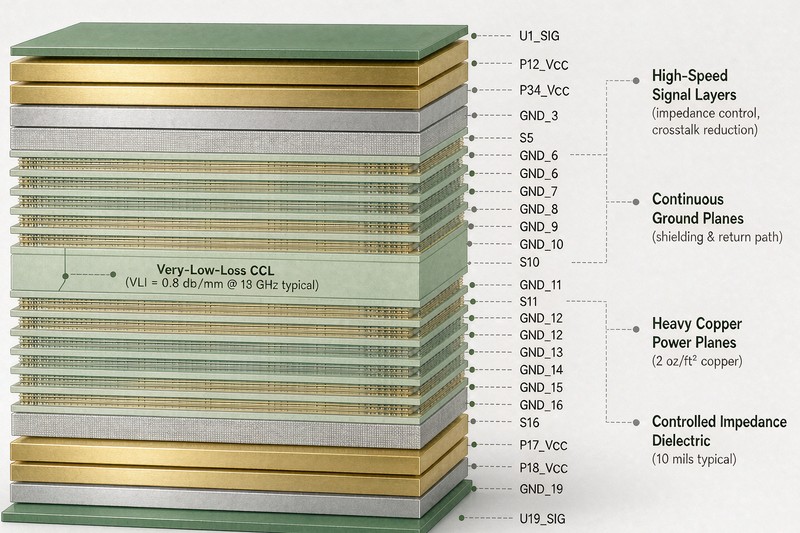
The layer stackup defines dielectric thickness, copper thickness, reference plane position, and material type. A 4-layer, 6-layer, 8-layer, or 10-layer PCB may require different trace widths to achieve the same impedance.
For example, a 50-ohm microstrip on an outer layer may need a different width than a 50-ohm stripline on an inner layer. If the dielectric height changes, the impedance changes even when the trace width stays the same.
Step 3: Collect Material and Geometry Inputs
For a basic single-ended trace impedance calculation, you need:
| Input | Symbol | Example Description |
|---|---|---|
| Trace width | W | Finished copper width after etching |
| Copper thickness | T | Final copper thickness after plating |
| Dielectric height | H | Distance from trace to reference plane |
| Dielectric constant | Er / Dk | Laminate electrical property |
| Trace type | — | Microstrip, stripline, coplanar, etc. |
For differential pair impedance, you also need:
| Input | Symbol | Description |
|---|---|---|
| Trace spacing | S | Gap between the two traces |
| Pair geometry | — | Edge-coupled or broadside-coupled |
| Coupling environment | — | Outer-layer, inner-layer, coplanar, or stripline |
Step 4: Use a Calculator or Field Solver
A simple impedance calculator can estimate trace width or impedance. However, for high-speed PCB manufacture, a 2D field solver is usually more reliable than a basic formula because it can consider more geometry details.
For production-grade high-speed PCB design, impedance calculation should be confirmed against the manufacturer’s real stackup and fabrication process.
PCBWay states that online calculator results are approximate and that final values and layer construction should be calculated with the PCB manufacturer; Altium also recommends clear impedance requirements in the fabrication data package.
Step 5: Document the Impedance Requirement
Your PCB fabrication notes should define:
| Required Information | Example |
|---|---|
| Target impedance | 50 Ω single-ended, 90 Ω differential |
| Tolerance | Commonly ±10%, or tighter if required |
| Layer | L1 microstrip, L3 stripline, etc. |
| Trace width and spacing | 5 mil / 5 mil, or as calculated |
| Reference plane | Adjacent GND plane |
| Material requirement | FR-4, low-loss material, Rogers, etc. |
| Test requirement | TDR coupon test if required |
Altium recommends giving the fabricator a stackup table and specifying impedance requirements clearly by layer, geometry, and target value.
Microstrip Impedance Calculation
A microstrip is a trace routed on an outer PCB layer with a reference plane underneath. It is common in RF routing, clock routing, and top-layer high-speed connections.
A simplified microstrip impedance relationship can be described as:
Z0 depends on W, H, T, and Er.
Where:
- Z0 = characteristic impedance
- W = trace width
- H = dielectric height to reference plane
- T = copper thickness
- Er = dielectric constant
In general:
| Change | Effect on Microstrip Impedance |
|---|---|
| Increase trace width | Impedance decreases |
| Decrease trace width | Impedance increases |
| Increase dielectric height | Impedance increases |
| Use higher Dk material | Impedance decreases |
| Increase copper thickness | Impedance decreases slightly |
| Add solder mask | May slightly reduce impedance |
Microstrip traces are easier to access and inspect, but they are more exposed to solder mask variation, surface copper plating, and external EMI than inner-layer stripline traces.
Stripline Impedance Calculation
A stripline is routed on an internal layer between two reference planes. Because the electromagnetic field is more contained inside the dielectric, stripline routing often provides better shielding and lower radiation than microstrip routing.
Stripline impedance depends on:
- Trace width
- Copper thickness
- Distance to upper and lower reference planes
- Dielectric constant
- Whether the stripline is symmetric or asymmetric
| Feature | Microstrip | Stripline |
|---|---|---|
| PCB layer | Outer layer | Inner layer |
| Reference plane | Usually one main plane | Two surrounding planes |
| EMI behavior | More exposed | Better field containment |
| Fabrication sensitivity | Affected by solder mask and plating | Affected by lamination thickness |
| Loss behavior | Often lower dielectric confinement | More dielectric interaction |
| Use case | RF, accessible routing, short runs | High-speed digital, sensitive signals |
Stripline is often preferred for high-density high-speed PCB design when EMI control and stable return paths are important.
Differential Pair Impedance Calculation
Differential impedance is not simply twice the single-ended impedance. It also depends on coupling between the two traces.
Differential pair impedance is affected by both individual trace impedance and the spacing between the two traces. When the spacing becomes smaller, coupling increases and differential impedance usually decreases.
For differential pairs, the most important design rules are:
| Factor | Why It Matters |
|---|---|
| Pair spacing | Controls coupling and differential impedance |
| Pair symmetry | Reduces skew and mode conversion |
| Reference plane continuity | Maintains stable return current |
| Length matching | Helps timing alignment |
| Via count | Reduces discontinuities |
| Connector breakout | Often creates impedance disturbance |
A common mistake is calculating a differential pair only as “two 45-ohm traces = 90 ohms differential.” That is incomplete because coupling changes the final differential impedance.
Key Factors That Affect PCB Impedance
1. Trace Width
Trace width is usually the most adjustable variable during layout. A wider trace generally reduces impedance. A narrower trace generally increases impedance. However, trace width also affects current capacity, routing density, and manufacturability.
2. Dielectric Thickness
The distance between trace and reference plane strongly affects impedance. If the dielectric is thicker, impedance usually increases. If the trace is closer to the reference plane, impedance usually decreases.
3. Dielectric Constant
A higher Dk material reduces impedance for the same trace geometry. In high-speed PCB design, Dk stability across frequency and temperature can be more important than the nominal Dk value alone.
4. Copper Thickness
Finished copper thickness includes base copper and plating. Thicker copper tends to reduce impedance. For fine-pitch high-speed layouts, heavy copper may make controlled impedance routing more difficult because trace width and etching tolerance become harder to control.
5. Solder Mask
Outer-layer microstrip impedance can be affected by solder mask because the mask changes the dielectric environment above the trace. If your design requires tight impedance control, confirm whether solder mask is included in the calculation.
6. Etching Tolerance
The manufactured trace width may differ from the design width because of etching and plating tolerances. This is why a manufacturer’s front-end engineering review is important.
MCL summarizes several major impedance factors, including trace width, copper thickness, dielectric thickness, and dielectric constant.
Typical Workflow: How to Calculate PCB Impedance Correctly
| Step | Action | Engineering Purpose |
|---|---|---|
| 1 | Identify high-speed nets | Know which signals need impedance control |
| 2 | Check IC/interface requirements | Define target impedance from reliable source |
| 3 | Select initial layer stackup | Set dielectric height and reference planes |
| 4 | Choose routing geometry | Microstrip, stripline, coplanar, or differential |
| 5 | Run impedance calculation | Estimate trace width and spacing |
| 6 | Review with PCB manufacturer | Confirm manufacturability and material availability |
| 7 | Apply layout rules | Lock width, spacing, length, via rules |
| 8 | Add fabrication notes | Communicate target impedance and tolerance |
| 9 | Use test coupons if required | Verify impedance through TDR testing |
| 10 | Review prototype results | Improve stackup before mass production |
For OEMs and engineering teams, this workflow helps bridge design intent and actual PCB production. Mars PCB provides high-speed PCB design and manufacturing support for projects where impedance, signal integrity, and stackup control need to be reviewed together.
Common Mistakes in PCB Impedance Calculation
Mistake 1: Calculating Impedance After Layout Is Finished
If impedance is calculated after routing, the trace width and spacing may already be locked into a poor design. Always define impedance rules before routing.
Mistake 2: Using FR-4 Dk as a Fixed Number
FR-4 is not a single material with one universal Dk value. Different laminates, resin content, glass weave, frequency, and thickness can change the effective dielectric behavior.
Mistake 3: Ignoring the Reference Plane
A trace without a continuous reference plane cannot maintain stable impedance. Plane splits, voids, and poor return paths can create discontinuities even if the trace width is correct.
Mistake 4: Treating Differential Impedance as Simple Addition
Differential impedance depends on coupling. Spacing matters. Pair geometry matters. The surrounding dielectric and copper environment matter.
Mistake 5: Not Communicating Tolerance
A target of 50 ohms without tolerance is incomplete. A manufacturer needs to know whether ±10%, ±7%, ±5%, or another tolerance is required.
Mistake 6: Relying Only on Free Online Calculators
Online calculators are useful for early estimates. They are not a substitute for final stackup verification, especially for dense, high-layer-count, high-frequency, or low-loss designs.
How to Specify Controlled Impedance to a PCB Manufacturer
A clear fabrication requirement reduces engineering back-and-forth and avoids production ambiguity. When sending files to a high-speed PCB supplier, include a controlled impedance table.
Example controlled impedance table:
| Net Group | Layer | Structure | Target Impedance | Width / Spacing | Reference Plane | Tolerance |
|---|---|---|---|---|---|---|
| RF_CLK | L1 | Microstrip | 50 Ω SE | As calculated | L2 GND | ±10% |
| USB3_TX/RX | L3 | Differential stripline | 90 Ω Diff | As calculated | L2/L4 GND | ±10% |
| PCIE_TX/RX | L5 | Differential stripline | 85 Ω Diff | As calculated | L4/L6 GND | ±10% |
| ETH_MDI | L1 | Differential microstrip | 100 Ω Diff | As calculated | L2 GND | ±10% |
A good manufacturer should be able to review:
- Whether the requested trace width is manufacturable
- Whether the selected material is available
- Whether the stackup supports the impedance target
- Whether impedance test coupons are needed
- Whether design changes are required before production
If your project requires both engineering review and production capability, you can consult Mars PCB for controlled high-speed PCB manufacturing before finalizing Gerber files.
How to Choose a High-Speed PCB Supplier for Impedance-Controlled Boards
Not every PCB supplier is equally suitable for impedance-controlled high-speed boards. When evaluating a supplier, look beyond price and lead time.
| Selection Factor | What to Check |
|---|---|
| Stackup engineering | Can the supplier recommend manufacturable stackups? |
| Material options | Does the supplier support FR-4, low-loss, RF, or hybrid materials? |
| Impedance control | Can they calculate and verify impedance by layer? |
| Tolerance capability | Can they support your required impedance tolerance? |
| TDR testing | Can they provide impedance test reports if needed? |
| DFM review | Do they check trace width, spacing, vias, and copper balance? |
| High-speed experience | Do they understand PCIe, USB, DDR, RF, and high-density layouts? |
| Prototype-to-volume support | Can they support both engineering samples and production runs? |
For custom electronics, networking hardware, industrial controllers, communication devices, and high-speed embedded systems, choosing the right PCB partner can reduce layout risk and shorten development cycles.
Mars PCB supports custom High-Speed PCB manufacture for projects requiring controlled impedance traces, multilayer stackups, signal integrity awareness, and manufacturing review.
FAQ
1. How do you calculate impedance in high-speed PCB design?
PCB impedance is calculated by using the trace width, copper thickness, dielectric thickness, dielectric constant, and transmission line type. For accurate high-speed PCB impedance control, designers usually use an impedance calculator or field solver and then confirm the result with the PCB manufacturer’s stackup.
2. What is the difference between microstrip and stripline impedance?
Microstrip impedance applies to an outer-layer trace with one main reference plane. Stripline impedance applies to an inner-layer trace between two reference planes. Stripline usually provides better shielding, while microstrip is easier to route and access.
3. What affects PCB trace impedance the most?
The most important factors are trace width, dielectric thickness, dielectric constant, copper thickness, solder mask, and reference plane quality. For differential pairs, trace spacing also strongly affects differential impedance.
4. Is 50 ohm PCB trace impedance always required?
No. 50 ohms is common for many RF and single-ended high-speed traces, but it is not universal. USB, PCIe, Ethernet, LVDS, DDR, and other interfaces may require different single-ended or differential impedance values.
5. Can I use an online PCB impedance calculator for production?
An online PCB impedance calculator is useful for early estimation, but production designs should be verified with the actual PCB stackup, material data, fabrication tolerance, and manufacturer impedance control process.
6. What files should I send for controlled impedance PCB manufacturing?
You should send Gerber or ODB++ files, drill files, stackup requirements, impedance target table, material requirements, copper thickness, tolerance requirements, and any TDR testing requirements.
7. Why does differential pair impedance change with spacing?
Differential pair impedance changes because the two traces are electromagnetically coupled. When spacing decreases, coupling increases and differential impedance usually decreases. This is why width and spacing must be calculated together.
Conclusion
PCB impedance calculation is a critical part of high-speed PCB design. It helps engineers control reflections, improve signal integrity, reduce EMI risk, and ensure that high-speed interfaces perform as intended.
The key to successful impedance control is not only calculating a trace width, but matching that calculation with a real PCB stackup and a manufacturer’s process capability. Before fabrication, define the target impedance, select the right transmission line structure, confirm material parameters, document the controlled impedance table, and review the design with an experienced PCB supplier.
For projects involving high-speed digital signals, RF routing, differential pairs, multilayer stackups, or controlled impedance requirements, Mars PCB can help review and manufacture high-speed PCB designs with practical engineering support from prototype to production.